
Table of Contents
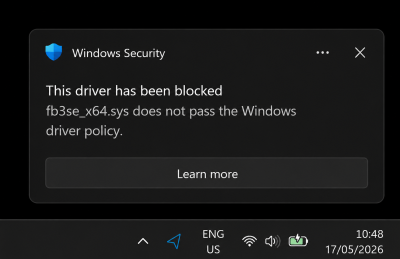
FB3 Driver blocked by Windows 11 Update 10.0.22621
Notice: 7/22/26
In recent Windows updates, starting around version 10.0.22621, Microsoft has changed the architecture responsible for driver signature verification. As a result, the FB3 driver may be blocked by Windows after a certain period of time and/or after multiple system restarts.
Please download the following full installers from our download center that already include the latest drivers for FB3.
Below you will find the manual installation procedure that is no longer required if you use the installers from above.
Notice: 5/22/26
In recent Windows updates, starting around version 10.0.22621, Microsoft has changed the architecture responsible for driver signature verification. As a result, the FB3 driver may be blocked by Windows after a certain period of time and/or after multiple system restarts.
We are currently working on a permanent solution to resolve this issue. Updates will be posted here as soon as they become available.
Latest Update:
We now have a beta driver available that has been working successfully for all clients who have tested it so far. Our goal is to fully validate this new FB3 driver and include it in the next installer release for both software packages. Once the issue has been permanently resolved through this update, this notice will expire and be removed.
In the meanwhile, this driver can be downloaded using the link below:
This driver will need to be installed manually. Installation instructions below:
Installation instructions
//Device Manager can be opened by using the keys: Win + X followed by selecting Device Manager from the list.
//
